Applying RAG pattern to navigate your knowledge store
Building a knowledge chatbot powered by OpenSearch and Amazon Bedrock
Retrieval-augmented generation (RAG) enriches large language models (LLMs) by incorporating an external knowledge source during predictions to provide more context, historical data, and relevant information. We can use it for a variety of cases:
- providing real-time context such as current traffic conditions, weather or stock market fluctuations;
- incorporating user-specific details like their recently viewed items on the website or preferences based on past interactions;
- including relevant factual information from documents that were not in the LLM’s training data, either due to privacy concerns or because of updates that were made after training. For example, updated medical research findings or market trends from industry reports.
RAG offers a significantly cheaper and faster alternative to retraining or fine-tuning an existing model. That’s why, RAG workloads are starting to be adopted across retail, financial services, and healthcare customers.
In this article we’ll show you and example of such scenario, how you can create a chatbot to answer questions which require specific technical knowledge.
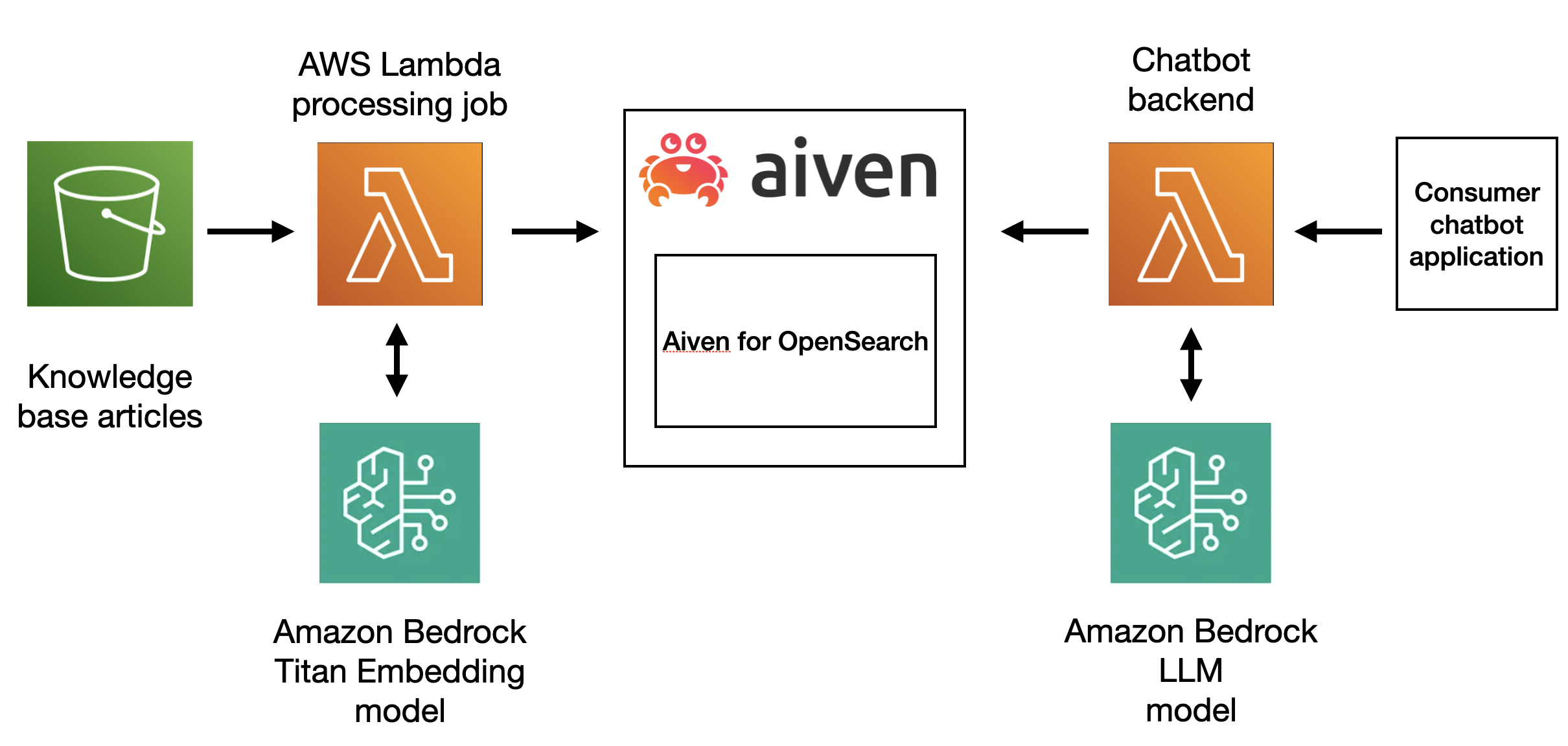
To create the chatbot we’ll use Amazon Bedrock foundation models, OpenSearch will play the role of a vector database and to create a pipeline we’ll rely on AWS Serverless Application Model. The overall architecture can be split into two parts. First, we process each documentation entry to create an embedding and store in OpenSearch, next we set up a Lambda function to accept user’s question, enhance the prompt by adding additional context and then pass it to LLM to retrieve an answer:
Prerequisites
To follow along you’ll need:
- access to AWS and sufficient permissions to deploy new services programmatically and access Amazon Bedrock foundation models;
- a document set to be used as additional knowledge;
- we’ll be using Aiven for OpenSearch in this article and you’ll need an Aiven account to create the service, follow these instructions to create your account.
All necessary code you’ll find in this github repository. We recommend you clone the code to run the commands we’ll describe below.
Step 1. Set up Aiven for OpenSearch
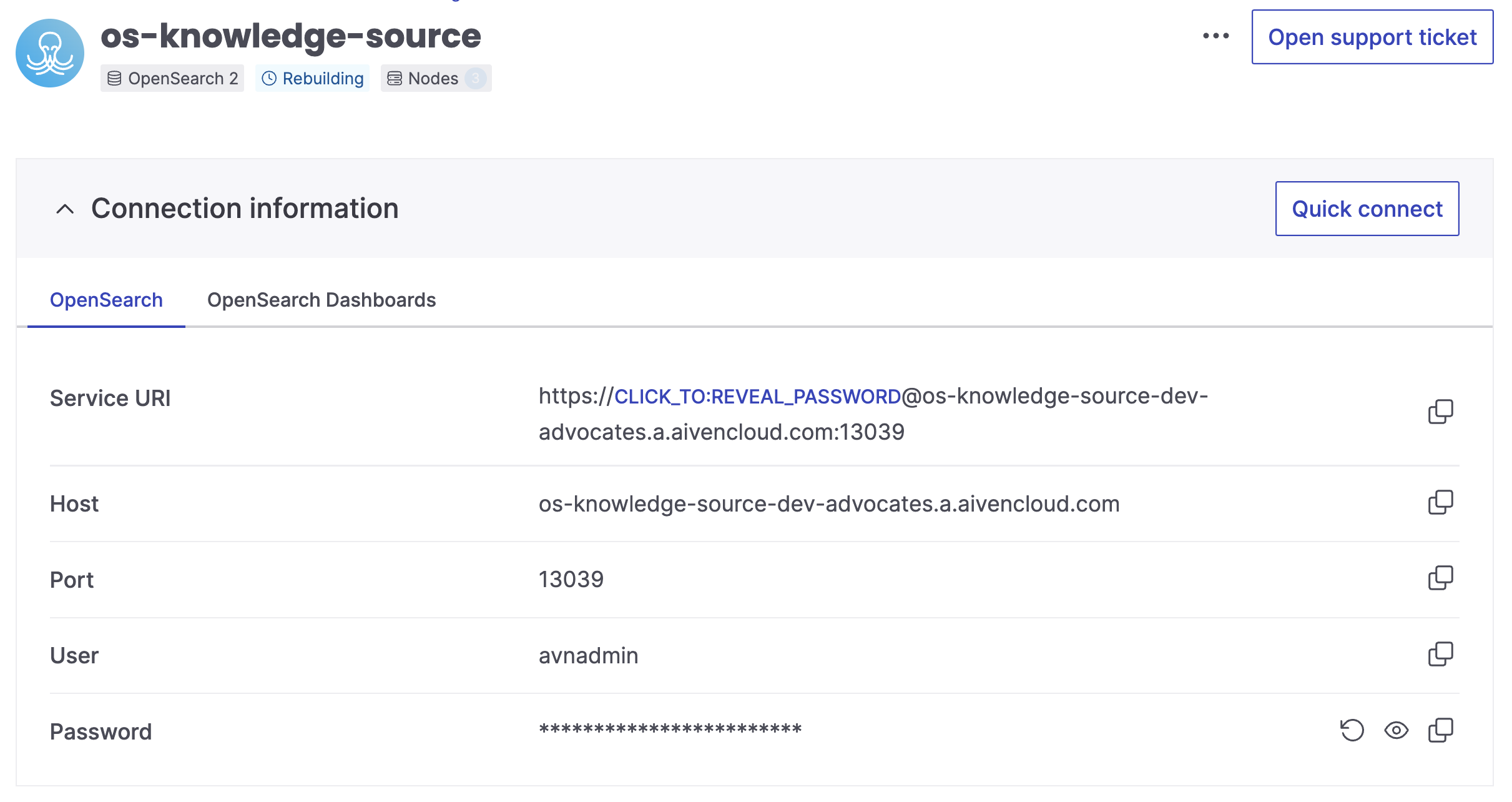
Start by creating Aiven for OpenSearch service, this is where we store the embeddings for the documents.
Step 2. Deploy a serverless application using AWS
AWS CLI and SAM CLI
If you don’t have AWS CLI installed on your machine follow these steps to set it up.
We’ll also use AWS Serverless Application Model (AWS SAM) to simplify the process of deploying resources on AWS. Follow these instructions to install SAM CLI.
To start using AWS CLI we need to configure it and provide authentication information:
- In the IAM dashboard create a new user.
- Attach a permission policy that will allow SAM CLI to deploy new resources through AWS CloudFormation (for example, you can use AdministratorAccess).
- Create access key for the user.
- Run
aws configureand specify AWS Access Key ID and AWS Secret Access Key. - We recommend you set us-east-1 for the region to see the same models available through Bedrock
Note, that these permissions are necessary to allow SAM CLI to deploy the resources while granular permissions for each resource are specified individually in SAM template.
Request model access from Amazon Bedrock
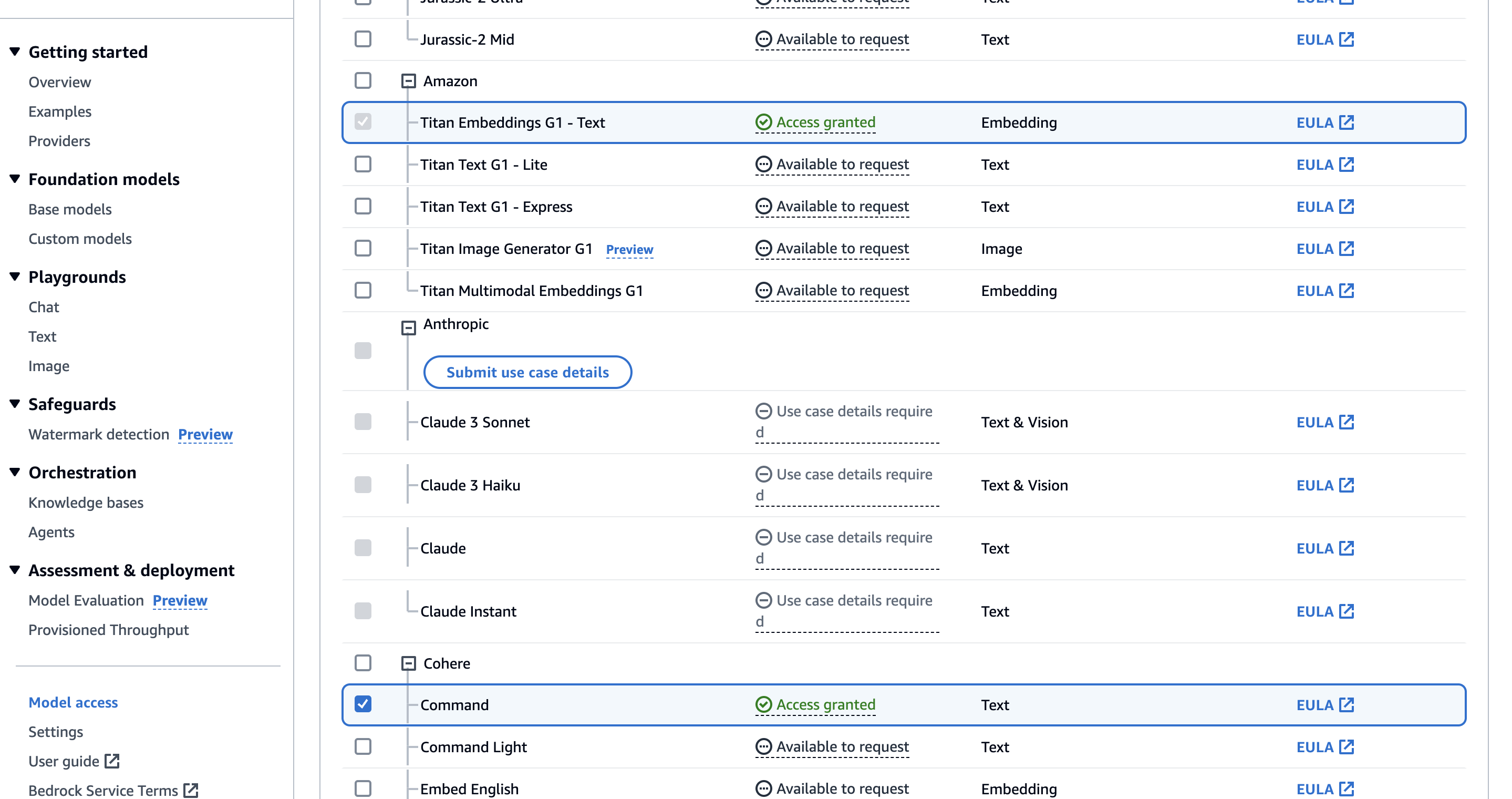
Access to Amazon Bedrock foundation models isn’t granted by default. To get Go to Amazon Bedrock Model access. Click on “Manage model access” and select two items:
Titan Embeddings G1that we need to convert our text documents into embeddings.- Cohere command to create responses.
Create a AWS SAM template
To create AWS pipeline and deploy all related resources together as a single entity we use AWS SAM. With AWS SAM we can list all resources and their requirements within SAM template. You can find the complete template’s code in the GitHub repo.
The most interesting part happens in the section Resources, where we specify which AWS services we want to deploy and with which settings. Let’s go one by one and see what they do:
DocumentBucket creates a storage bucket on Amazon S3. This is where we’ll add documents with external knowledge. Whenever a new document is added, upload notifications are sent to an SQS queue. Additionally, here we block public access to the bucket and specify the rules for cross-origin resource sharing for security reasons.
  DocumentBucket:
    Type: "AWS::S3::Bucket"
    Properties:
      BucketName: !Sub "${AWS::StackName}-${AWS::Region}-${AWS::AccountId}"
      NotificationConfiguration:
        QueueConfigurations:
          - Event: 's3:ObjectCreated:*'
            Queue: !GetAtt EmbeddingQueue.Arn
      CorsConfiguration:
        CorsRules:
          - AllowedHeaders:
              - "*"
            AllowedMethods:
              - GET
              - PUT
              - HEAD
              - POST
              - DELETE
            AllowedOrigins:
              - "*"
      PublicAccessBlockConfiguration:
        BlockPublicAcls: true
        BlockPublicPolicy: true
        IgnorePublicAcls: true
        RestrictPublicBuckets: true
DocumentBucketPolicy sets a policy for each document bucket, ensuring that access is denied over non-secure (HTTP) connections.
  DocumentBucketPolicy:
    Type: "AWS::S3::BucketPolicy"
    Properties:
      PolicyDocument:
        Id: EnforceHttpsPolicy
        Version: "2012-10-17"
        Statement:
          - Sid: EnforceHttpsSid
            Effect: Deny
            Principal: "*"
            Action: "s3:*"
            Resource:
              - !Sub "arn:aws:s3:::${DocumentBucket}/*"
              - !Sub "arn:aws:s3:::${DocumentBucket}"
            Condition:
              Bool:
                "aws:SecureTransport": "false"
      Bucket: !Ref DocumentBucket
EmbeddingQueue creates a queue in Amazon SQS. This queue will receive messages triggered by documents being uploaded to S3.
  EmbeddingQueue:
    Type: AWS::SQS::Queue
    DeletionPolicy: Delete
    UpdateReplacePolicy: Delete
    Properties:
      VisibilityTimeout: 180
      MessageRetentionPeriod: 3600
EmbeddingQueuePolicy sets a policy allowing S3 to send messages to the EmbeddingQueue in SQS.
  EmbeddingQueuePolicy:
    Type: AWS::SQS::QueuePolicy
    Properties:
      Queues:
        - !Ref EmbeddingQueue
      PolicyDocument:
        Version: "2012-10-17"
        Id: SecureTransportPolicy
        Statement:
          Effect: Allow
          Principal:
            Service: "s3.amazonaws.com"
          Action:
            - "sqs:SendMessage"
          Resource: !GetAtt EmbeddingQueue.Arn
GenerateEmbeddingsFunction creates a Lambda function responsible for generating embeddings. It’s configured to have access to the necessary environment variables and is triggered by incoming messages in the EmbeddingQueue.
GenerateEmbeddingsFunction:
    Type: AWS::Serverless::Function
    Properties:
      CodeUri: src/generate_embeddings/
      Timeout: 180
      MemorySize: 2048
      Policies:
        - SQSPollerPolicy:
            QueueName: !GetAtt EmbeddingQueue.QueueName
        - S3CrudPolicy:
            BucketName: !Ref DocumentBucket
        - Statement:
            - Sid: "BedrockScopedAccess"
              Effect: "Allow"
              Action: "bedrock:InvokeModel"
              Resource: "arn:aws:bedrock:*::foundation-model/amazon.titan-embed-text-v1"
      Environment:
        Variables:
          OPENSEARCH_URL: !Ref OpensearchURL
          BUCKET: !Ref DocumentBucket
      Events:
        EmbeddingQueueEvent:
          Type: SQS
          Properties:
            Queue: !GetAtt EmbeddingQueue.Arn
            BatchSize: 1
The code of this function is take from src/generate_embeddings of the main.py file:
def lambda_handler(event, context):
    # identify filename
    event_body = json.loads(event["Records"][0]["body"])
    print(event_body)
    key = event_body["Records"][0]["s3"]["object"]["key"]
    file_name_full = key.split("/")[-1]

    # download data record
    s3.download_file(BUCKET, key, f"/tmp/{file_name_full}")
    loader = TextLoader(f'/tmp/{file_name_full}')
    document = loader.load()

    # setup Bedrock Embeddings for OpenSearch
    bedrock_runtime = boto3.client(
        service_name="bedrock-runtime",
        region_name="us-east-1",
    )

    # Interface for embedding models
    model = BedrockEmbeddings(
        model_id="amazon.titan-embed-text-v1",
        client=bedrock_runtime,
        region_name="us-east-1",
    )

    vector_search = OpenSearchVectorSearch(OPENSEARCH_URL, index_name, model)

    # perform vector search
    response = vector_search.from_documents(
        documents=document,
        embedding=model,
        opensearch_url=OPENSEARCH_URL,
        use_ssl = True,
        index_name=index_name,
        bulk_size=5000,
        vector_field="embedding"
    )
    print(response)
StreamingFunction creates another Lambda function. Its purpose is to handle streaming responses. It’s granted permissions to perform certain actions related to managed service Bedrock.
  GenerateResponseStreaming:
    Type: AWS::Serverless::Function
    Properties:
      CodeUri: src/generate_response_streaming
      Handler: index.handler
      Runtime: nodejs18.x
      Timeout: 30
      MemorySize: 256
      Policies:
        - Statement:
            - Effect: Allow
              Action: 'bedrock:*'
              Resource: '*'
      Environment:
        Variables:
          OPENSEARCH_URL: !Ref OpensearchURL
The code is taken from src/generate_response_streaming and written in JavaScript, because at the moment Lambda supports response streaming only on Node.js managed runtimes. Here is the content of index.js:
const runChain = async (query, responseStream) => {
    try {

        // create OpenSearch client
        const openSearchClient = new Client({
            nodes: process.env.OPENSEARCH_URL
        });

        // setup Bedrock Embeddings for OpenSearch
        // interface for embedding models
        const model = new BedrockEmbeddings({region: awsRegion});
        const index_name = "knowledge-embeddings"
        const vectorStore = new OpenSearchVectorStore(model, {
            openSearchClient,
            indexName: index_name,
            vector_field: index_name
        });

        const retriever = vectorStore.asRetriever();

        // define prompt template
        const prompt = PromptTemplate.fromTemplate(
            `Answer the following question based on the following context:
            {context}

            Question: {question}`
        );

        const llmModel = new BedrockChat({
            model: 'cohere.command-text-v14',
            region: awsRegion,
            streaming: true,
            maxTokens: 1000,
        });

        // create streaming chain
        const chain = RunnableSequence.from([
            {
                context: retriever.pipe(formatDocumentsAsString),
                question: new RunnablePassthrough()
            },
            prompt,
            llmModel,
            new StringOutputParser()
        ]);

        const stream = await chain.stream(query);
        for await (const chunk of stream) {
            responseStream.write(chunk);
        }
        responseStream.end();
    } catch (error) {
        // Output the error
        responseStream.write(`Error: ${error.message}`);
        responseStream.end();
    }
};
export const handler = awslambda.streamifyResponse(async (event, responseStream, _context) => {
    console.log(JSON.stringify(event));
    const query = event["queryStringParameters"]["query"]
    await runChain(query, responseStream);
    console.log(JSON.stringify({"status": "complete"}));
});
StreamingFunctionInvocationURL provides a URL for invoking the StreamingFunction in streaming mode. This URL requires AWS IAM authentication.
  GenerateResponseStreamingInvocationURL:
    Type: AWS::Lambda::Url
    Properties:
      TargetFunctionArn: !Ref GenerateResponseStreaming
      AuthType: AWS_IAM
      InvokeMode: RESPONSE_STREAM
Build and deploy resources
Time to bring our SAM template into action: deploy and build our application.
Make sure that your environment has python at least of version 3.11 and run:
sam build
if you experience problems try running a verbose version of the command with:
sam build --debug
Once the project is built, we can deploy it. Run
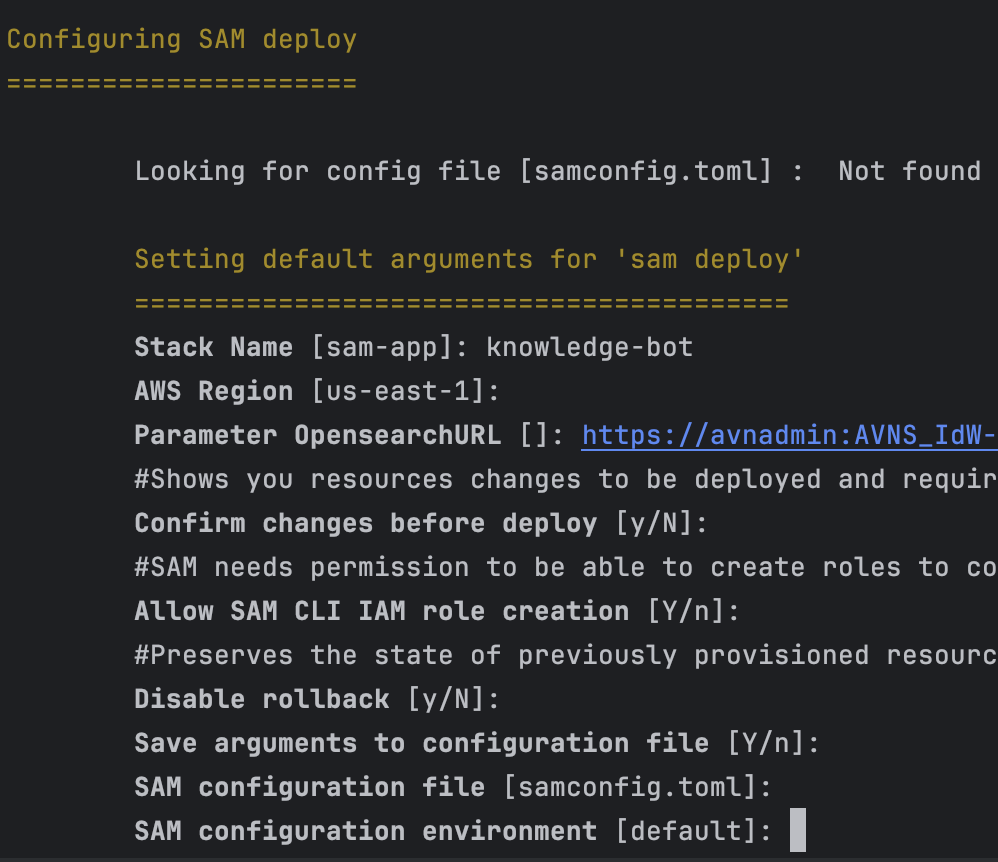
sam deploy --guided
and provide the service URI of the OpenSearch service that we’ve created:
Wait for the resources being deployed.
Step 3. Upload your data
Now that our pipeline is running, time to flow some knowledge into it. You can use any text documents that you have, I used a set of documentation article for Aiven platform.
Go to the S3 bucket that was just created and upload the text files there.
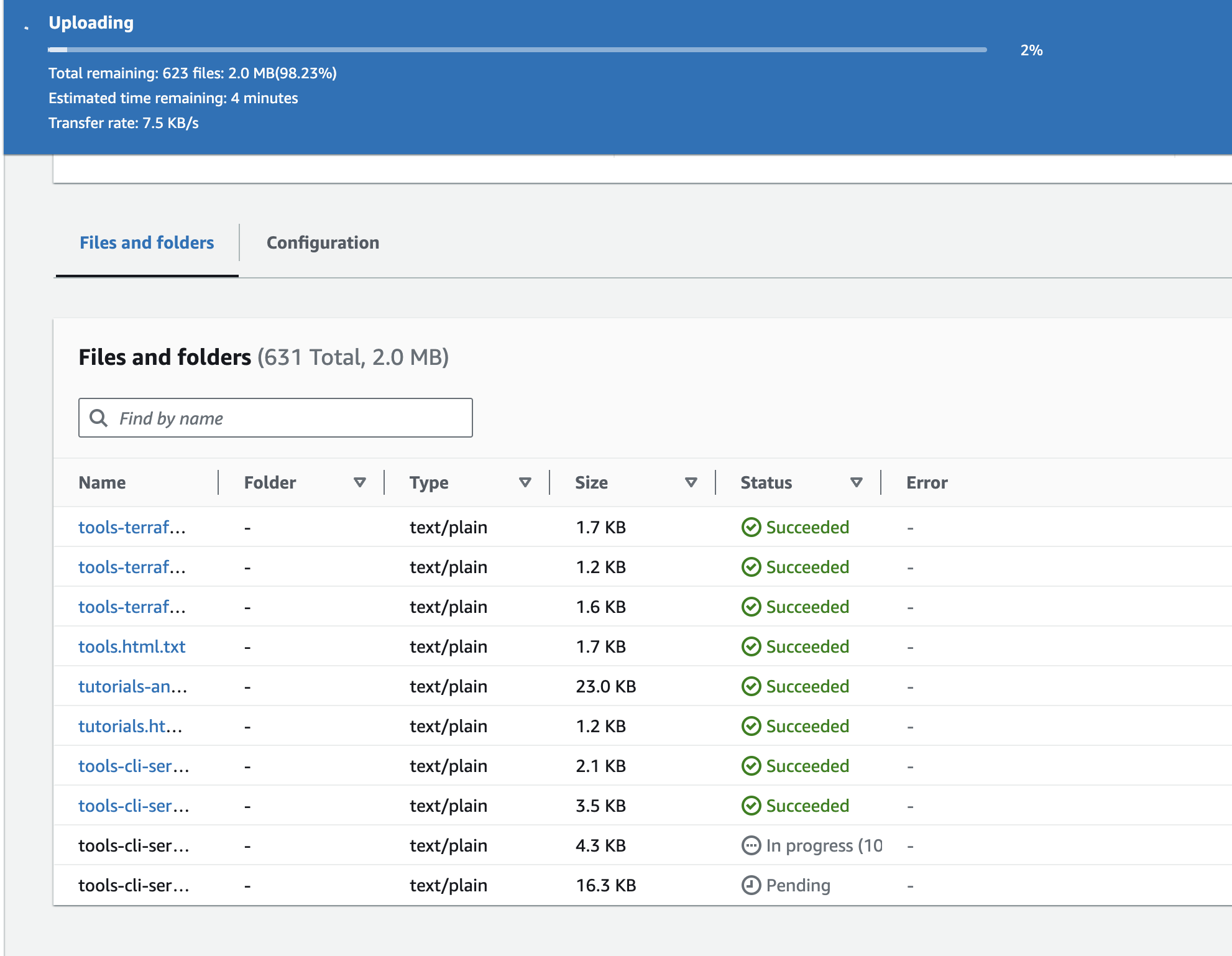
Each time a new document is uploaded, it is added to an embedding queue, transformed into embedding using AWS Bedrock model and the embedding is uploaded into OpenSearch.
Step 4. Invoking a chat function - let’s ask a question! 💬
And finally it is time to run the test and invoke our function! There are different ways how you can achieve this.
By default the way we set up our Lambda function, it requires AWS IAM authentication to have access to execute it. Alternatively you can also grant public access to your function URL:
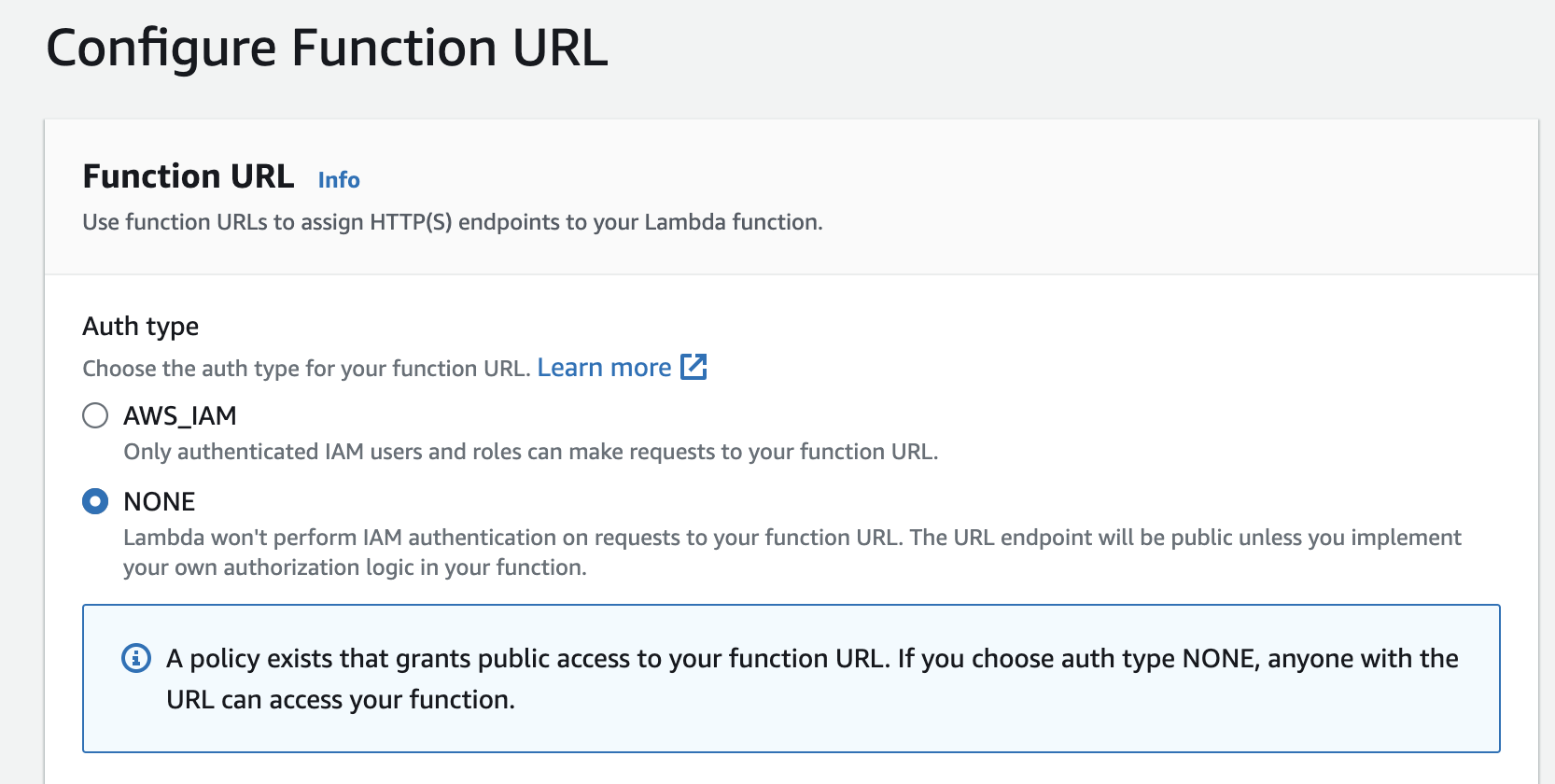
If you choose auth type NONE, anyone with the URL can access your function.
You can run it directly from the terminal using CURL:
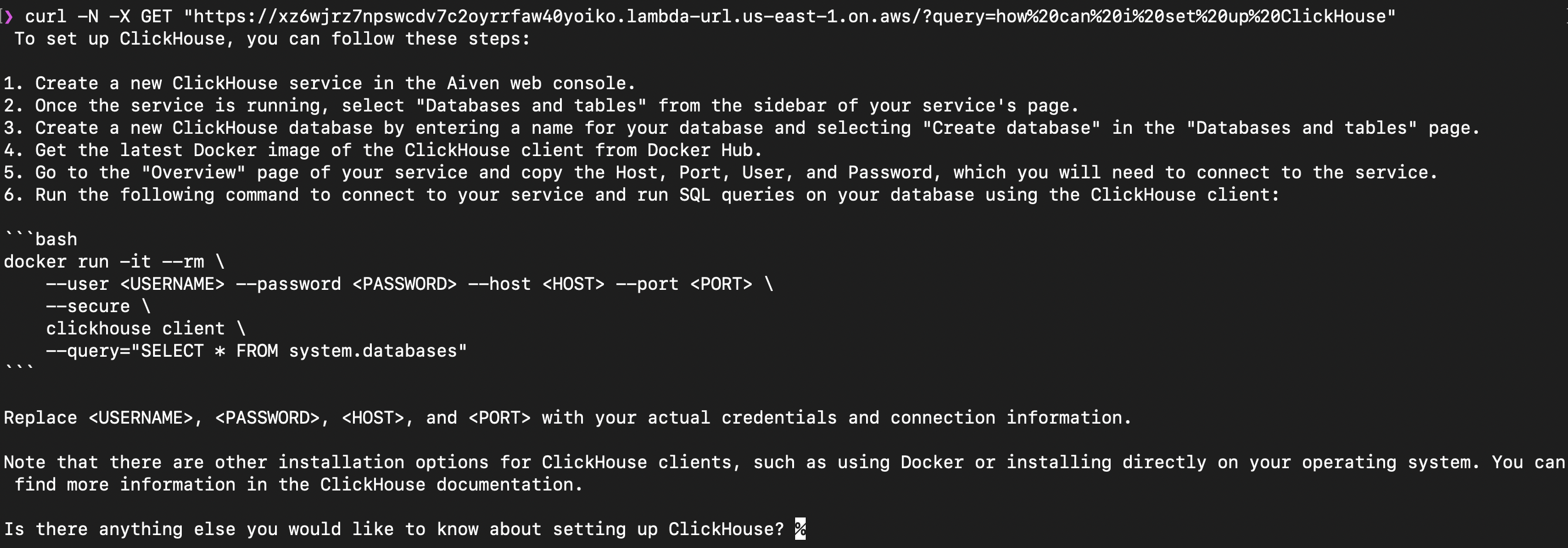
In the example above we’ve asked a question how to set up ClickHouse. One of the provided documents contained instructions describing how to create a service Aiven for ClickHouse. Vector search returned those documents to LLM and the information was used as a part of response. If you run this live you’ll also see that the response was output as a chain of text chunk by chunk.
Note, that this Bedrock model doesn’t like very short questions, so make sure to ask something that is sufficiently descriptive. If you have problems, check out Lambda logs in CloudWatch.
Cleanup
To clean up all resources created in this article:
- Delete Aiven for OpenSearch service
- Empty the S3 bucket where you uploaded documents
- run
sam deleteto terminate and remove created AWS resources.
What’s next
After following this tutorial you’ve learned how to build a knowledge chatbot powered by OpenSearch and AWS Bedrock . If you’re interested in related topics check out these articles:
- When text meets image: a guide to OpenSearch® for multimodal search
- Retrieval augmented generation with OpenAI and OpenSearch®
- Find your perfect movie with ClickHouse®, vector search, Hugging Face API, and Next.js
- Image recognition with Python, OpenCV, OpenAI CLIP and pgvector
- Social search in real time: Exploring Mastodon data with Apache Kafka® and OpenSearch®